
7 KiB
Dialogue System Runtime Spec
This document is a code-aligned reference for how dialogue is parsed, evaluated, and executed in-game.
Quick Visual
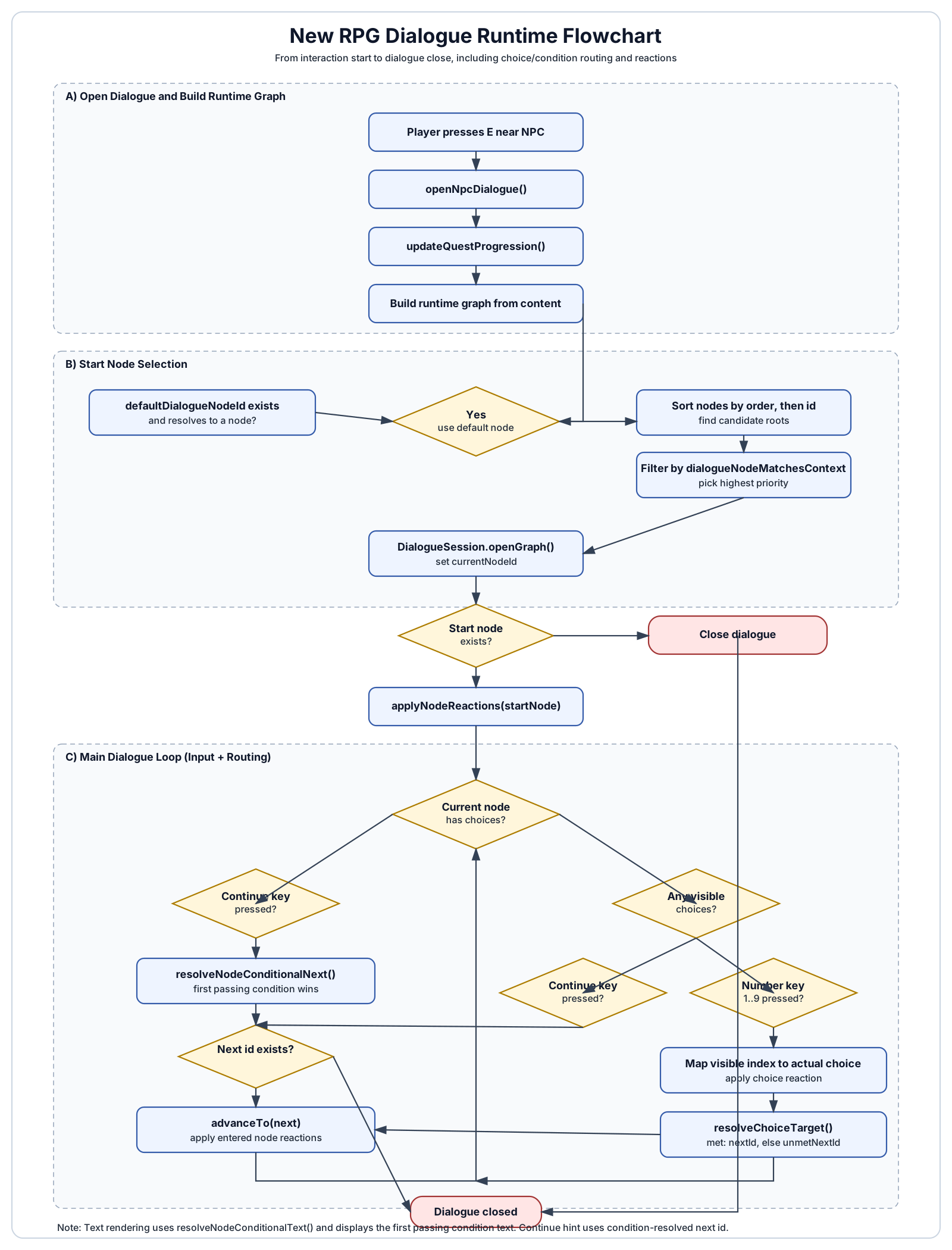
1) Data Model (Current Canonical Shape)
Dialogue nodes are authored primarily with arrays:
conditions[]textconditionTypeconditionValue(foritem, useitemId:quantity)conditionStepIdconditionNotnextId
reactions[]reactionTypereactionValue
choices[]textnextIdconditionTypeconditionValueconditionStepIdconditionNotreactionTypereactionValue
Compatibility fields still exist in runtime structures (text, conditionType, conditionValue, conditionStepId, conditionNot, nextId, reactionType, reactionValue) and are used as fallback when needed.
2) Parsing Order (JSON -> Runtime Content)
Parsing entrypoint:
ContentManager::loadAll()readDialogueNodes()for each NPC
Per dialogue node, parsing order is:
- Read legacy/base fields first (
id,text, legacy condition/reaction/next/order fields). - Read
conditions[].- Each condition uses
condition.text, defaulting to basenode.textif missing.
- Each condition uses
- If
conditions[]is empty, synthesize exactly one condition from legacy/base fields. - Read
reactions[]. - If
reactions[]is empty, only synthesize a fallback reaction if legacy reaction fields were present in JSON.- This allows intentionally empty reaction arrays.
- Read
choices[].- Supports migration path for very old choice payloads missing
conditionType.
- Supports migration path for very old choice payloads missing
3) Runtime Graph Build Order
At interaction start (E near NPC):
openNpcDialogue()callsupdateQuestProgression().- NPC node defs are converted to runtime
game::DialogueNodeobjects. - Conditions, reactions, and choices are copied into runtime node vectors.
- Start node is selected with
selectDialogueStartNodeId(). DialogueSession::openGraph()is called.- If a start node exists, node reactions are applied immediately (
applyNodeReactions()).
4) Start Node Selection Logic
selectDialogueStartNodeId() order:
- If
defaultDialogueNodeIdexists and is valid, use it. - Else, sort nodes by
order, thenid. - Build inbound edge set from:
- node
nextId - choice
nextId
- node
- Candidate roots are nodes with no inbound references.
- If none, all nodes become candidates.
- Filter candidates by
dialogueNodeMatchesContext(). - Pick highest
dialogueNodePriority().- Priority:
quest_step_completed>quest_started/quest_completed>item/flag> default.
- Priority:
- Tie-break by smaller
order. - If no contextual match, fall back to first sorted node.
5) Condition Evaluation Order
Core function: doesConditionPass(type, value, stepId, conditionNot).
Evaluation sequence:
- Evaluate base condition type.
- Supported types include:
alwaysflagitem(supportsitemId:quantity; quantity defaults to1if omitted)levelcurrency(supportskey:amountformat)skillquest_started,quest_completedquest_step_completed
- Apply NOT inversion if
conditionNot == true.
Node-level match order:
resolveMatchedNodeCondition(node)scansnode.conditionsfrom index 0 upward.- First passing condition wins.
That winning condition is then used for:
- Display text via
resolveNodeConditionalText()(condition.text, else legacynode.text). - Continue target via
resolveNodeConditionalNext()(condition.nextId, else legacynode.nextNodeId).
6) Choice Visibility and Selection Order
Choice visibility:
buildVisibleChoiceIndices(node)iterates choices in list order.- Includes only choices where
doesChoiceMeetConditions(choice)returns true.
When user presses numeric choice key:
- Map key
1..9to visible index. - Resolve real choice index from
visibleChoiceIndices. - Apply choice reaction first (
applyDialogueReaction). - Resolve target with
resolveChoiceTarget(choice):- If condition passes ->
nextId - Else close
- If condition passes ->
- Advance to target with
advanceTo(). - Apply entered-node reactions.
updateQuestProgression().
7) Reactions Execution Order
applyNodeReactions(node):
- If
node.reactionsis non-empty, execute each in array order. - Else fallback to legacy single reaction fields.
applyDialogueReaction(type, value) supports:
grant_flag/grant_quest_flaggrant_itemusingitemId:quantityvalues such ascopper_ore:1start_questcomplete_quest
8) Input Execution Paths
A) Dialogue open + no choices
- Continue key (
E/ Enter / Space):- Resolve condition-based next node
- Advance or close
- Apply entered-node reactions (if advanced)
B) Dialogue open + choices exist
- If visible choices exist:
- Number keys choose branch
- If no visible choices:
- Continue key uses node condition-based next/close path
C) Escape
Esccloses dialogue immediately.
9) Rendering Order (Dialogue Box)
renderDialogueBox() draws:
- Speaker bar
- Body text from
resolveNodeConditionalText() - Visible choices list (if any)
- Footer hint:
[E] Continueif condition-resolved next exists[E] Closeotherwise
10) Flowchart
flowchart TD
  A[Player presses E near NPC] --> B[openNpcDialogue]
  B --> C[updateQuestProgression]
  C --> D[Build runtime graph from content nodes]
  D --> E[selectDialogueStartNodeId]
  E --> F[DialogueSession.openGraph]
  F --> G{Start node exists?}
  G -- No --> Z[Close]
  G -- Yes --> H[applyNodeReactions on start node]

  H --> I[Dialogue loop]
  I --> J{Current node has choices?}

  J -- No --> K{Continue key pressed?}
  K -- No --> I
  K -- Yes --> L[resolveNodeConditionalNext via first passing condition]
  L --> M{next exists?}
  M -- No --> Z
  M -- Yes --> N[advanceTo next]
  N --> O[applyNodeReactions on entered node]
  O --> I

  J -- Yes --> P[buildVisibleChoiceIndices]
  P --> Q{Any visible choices?}

  Q -- No --> R{Continue key pressed?}
  R -- No --> I
  R -- Yes --> L

  Q -- Yes --> S{Number key 1..9?}
  S -- No --> I
  S -- Yes --> T[Map visible index -> actual choice]
  T --> U[apply choice reaction]
  U --> V[resolveChoiceTarget]
  V --> W{target exists?}
  W -- No --> Z
  W -- Yes --> X[advanceTo target]
  X --> Y[applyNodeReactions on entered node]
  Y --> I
11) Practical Authoring Implications
- Condition order is behavior-critical. Put the most specific conditions first.
- Item conditions should be authored as
itemId:quantityso runtime quantity checks are explicit. - In the editor,
conditionType=itemsurfaces item picker + quantity input and writesconditionValuein that format. - Dialogue line text should be authored on condition entries (
conditions[].text). - Empty
reactions[]is valid and now preserved. - Choice order affects both visual order and numeric selection mapping.
12) Primary Source Files
src/content/ContentManager.cppsrc/game/Game.cppsrc/game/Dialogue.cppsrc/content/ContentTypes.hppsrc/game/Dialogue.hpp